How VOX Works?
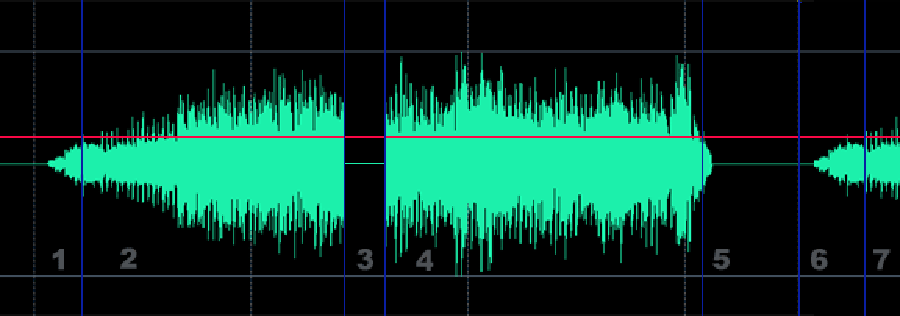
- 1. VOX waits until the input signal will exceeds a threshold. Current status "Scan..."
- 2. When the Input signal exceeds the VOX threshold, recording starts. Status "Recording..."
- 3. This is very important! You can adjust the "Reaction Time". If the duration of section 3 is less than the Reaction Time then recording will continue, otherwise VOX will stop recording and start a new track. At this example duration of section 3 less than the Reaction time and program continue recording. Many music compositions contain small silent parts. The Standard VOX system will split this composition into separate tracks, but our system will split the audio only if the silent part is greater than the "Reaction Time"
- 4. Program continues recording.
- 5. The Input signal has fallen below the threshold, but the program will wait for "Reaction time". It is still recording.
- 6. Now recording has stopped. Status "Scan..."
- 7. Start new track again!
** Red line show "VOX Threshold"